Below is a list of the three most frequently seen errors which might occur, together with their common causes and generic remedies which can lead you to the correct area of the Shipment to investigate.
Tote_Zone
Cause: This is caused by the Tote not being in the Zone expected by the Business Rule which controls the staging of Shipments.
Remedy: Ensure that the tote is in a valid staging location. This can be done by looking in the Topic Inventory, followed by either Stock by Storage Unit (StU) or Stock by Location.
Stu_Exist
Cause: Systemically, SnapFulfil does not believe that the Tote in which the Shipment's items have been picked, exists. This can, (although there may be several causes) be because it may already have been shipped off the system.
Remedy: As this error can originate from any one of a number of underlying causes, we would suggest that in the first instance, that the Service Desk is contacted to discuss and investigate the particular circumstances surrounding the Shipment concerned.
Pack_Fail
Cause: The system is unable to link the arrival of this Shipment/Consignment at the Pack Station, with an open Pack Task existing for the Tote scanned.
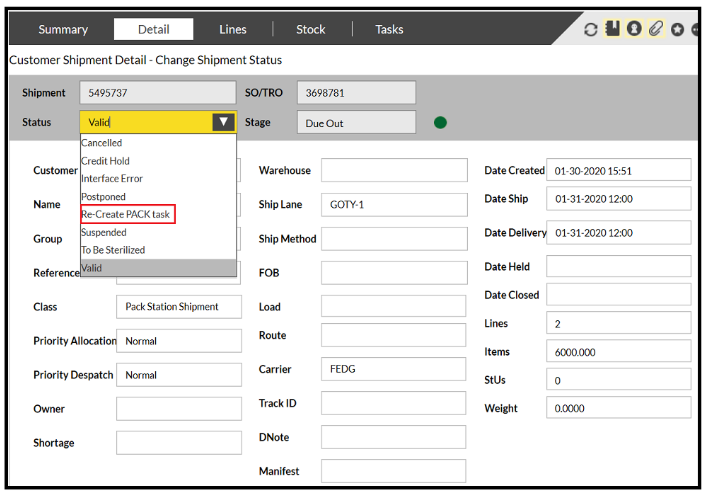
Remedy: Check that the Tote is in a valid "Staging" location and where this has had to be changed, use the 'Change Status' button at the bottom of the Shipment Header screen to select 'Recreate pack' which will generate new PACK and SASSM Tasks following the update you have just made, as show in the image below: