The common causes for this message being displayed are:
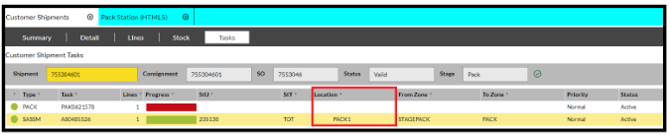
- There are still tasks outstanding for the shipment which have not been completed. These tasks will need to be completed before the tote can be packed. You can check this by going to the shipment or consignment screen and clicking on the 'Tasks' tab to see what is outstanding.
- A shortage may exist against the order (due to insufficient stock and / or depending on your Shortage rules). To progress the Shipment 'Set Cut-off' should be set from the Details tab in the Dispatch > Customer Shipments screen.
- If a tote has been scanned at one pack station it cannot then be scanned on another one to complete the packing.
- To see which Pack Station a totes was scanned on, select the order number, and open the Customer Shipments screen and select the 'Tasks' tab. This will display the Pack Station ID against the SASSM task.