
To interface files through the FTP directory you will need certain software that will enable you to view these directories.
We would recommend either WinSCP as a first choice or FileZilla as a second.
WinSCP
WinSCP can be downloaded from the official site:
https://winscp.net/eng/download.php
When using this it will look like a simple file explorer package where you are able to insert the .CSV files that you wish to import or collect the files that are needed to export.
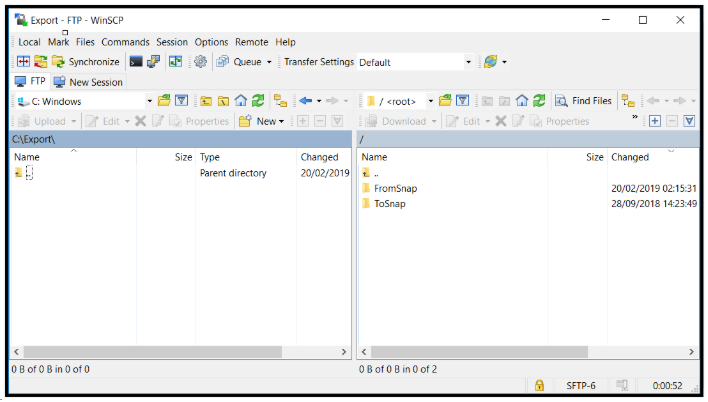
Once logged on you will see two folders as a base on the right hand side:
- FromSnap is where exported data from Snapfulfil is placed, waiting for you to collect it. Snapfulfil does not push data to your HOST system.
- ToSnap is where your HOST system will place any files to be interfaced into Snapfulfil. The interface job runs at predetermined intervals which will be discussed during the original set up but normally it is every 30 seconds.
Filezilla
Filezilla can be downloaded from here:
https://filezilla-project.org/download.php?type=server
Although this looks more complicated it works in much the same way:
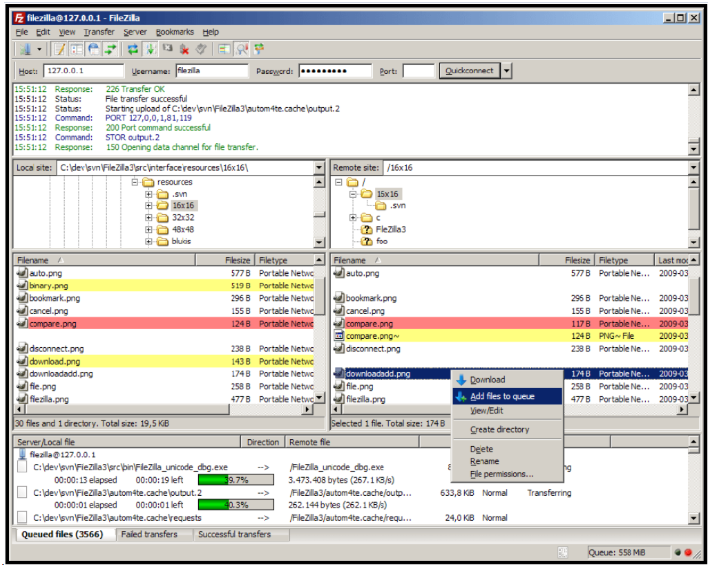
The top pane shows a log of what is / has happened and whether file transfers have been completed.
The middle 4 panes dictate the To and From directories and which files to select for transfer.
The bottom pane shows the progress of the file transfer.