Task Standards
The accuracy of the information presented within the Operator Performance screen depends on the Task Standards being set correctly. If you are looking to make use of the Operator Performance screen for the first time, or wish to update the Task Standards currently set up within your system, the Service Desk will issue you with a spreadsheet requesting the following information:
- Task: Average time taken to complete task (Time to scan the Tote at the beginning of the pick)
- Slot: Time required to travel to each slot on the task. (Note that this will also include time for traveling from the final pick slot to the deposit slot (Staging). For example, if this is a 3 line task then the slot time will be added 4 times, once for each pick slot and once for taking the tote to the Staging slot.)
- STU Pickup: Time to add per STU Pickup action
- STU Deposit: Time to add per STU Deposit action
- Item Pick: Time to add per Item Pick Action
- Item Drop: Time to add per Item Drop Action
These criteria are what SnapFulfil will use to calculate the results within Operator Performance.
Operator Performance
The Operator Performance screen can be found within the Activity topic. You will need to select the Team you wish to monitor and also input a Start Date and End Date. The system will then return the required information.
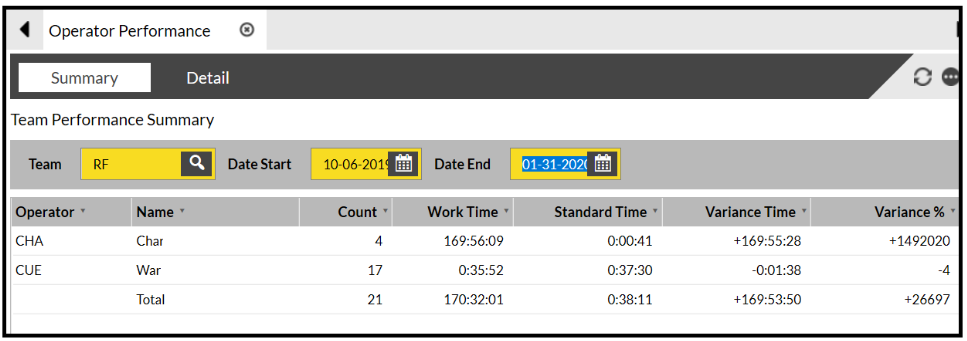
A guide to each of the fields is below:
- Operator - The ID of the Operator who completed the tasks.
- Name - The name of the Operator who completed the tasks.
- Tasks - The total number of tasks completed by the Operator between the selected dates.
- Work Time - The total time taken for the tasks to be completed. This is calculated from the duration between the time the task was allocated to the Operator and the time the task was completed (excluding the time period for when the task was suspended).
- Standard Time - The total time expected to complete the tasks.
- Variance Time - The time difference between the Work Time and Standard Time. Negative values indicate that the tasks have been completed quicker than expected; positive values indicate that the tasks have taken longer to complete than expected.
- Variance % - This is a calculated figure and uses the following formula: ((Standard Time / Variance Time) x 100).
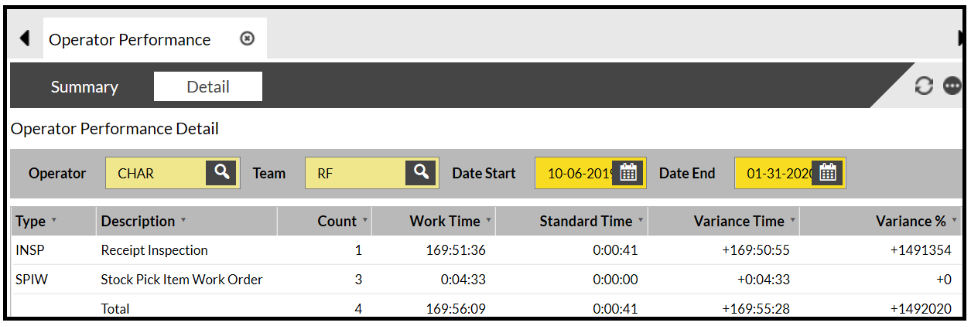
If you wish to see a detailed breakdown of the tasks an Operator has completed, click on them and then click View Detail.