
When Loads do not progress to the Stage you are expecting there are a few things to check.
Are all tasks Complete?
If all Pick Tasks have not been fully completed the Load will not progress to the next stage.
This could be due to Location issues when picking or a SKU issue that need investigating.
When on the Load Details screen, click the Tasks tab and look for Pick Tasks in a red (not started) or yellow (in progress) color.
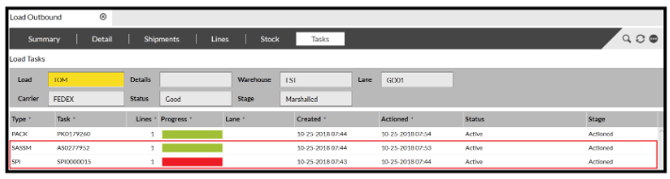
If you find an incomplete Task, double click the Task to display the relevant information needed to be investigated further.
Are all Shipments on the Load progressed to the same Stage?
All Shipments must be at the same Stage for the Load to progress.
The Load will always display the earliest Stage.
For example, if only one shipment is at Picking and the rest are at Marshalled, the load will remain at Picking.
Is all the picked Stock in the correct Zone/Location?
Ensure that all the picked Stock is in the correct loading Bay, Dock or Location.
If all these have been checked and the Load will not progress, please contact the service desk and we'll be happy to assist you further.