
The parcel tracking number is created when a pack station user packs an order. This triggers a workflow to notify the carrier of a new parcel.
- If the notify is successful a carrier label is produced, the tracking number is populated in SnapFulfil and the order is usually automatically shipped. Some customers may have the automatic shipping turned off.
- If the notify to the carrier fails an error label is printed. The user can often correct the error and perform a Retry Notify on the shipment to attempt to create a carrier label again.
You can find more details about error labels and how to perform a 'Retry Notify' here: https://snapfulfil.com/help-center/how-to-troubleshoot-a-carrier-error-label
If a shipped shipment has no tracking information, this usually means the order was shipped manually due to a user clicking the ‘Ship’ button on the Customer Shipments screen. There will be no Tracking information within Snapfulfil if this is the case.

To see if a Shipment has been manually shipped by a user, firstly open the Customer Shipments screen (as shown above), then:
- Highlight the order in question.
- Select the ‘Details’ tab.
- Select Menu
 from the options bar and choose
  .
.
A history of the shipment is displayed.
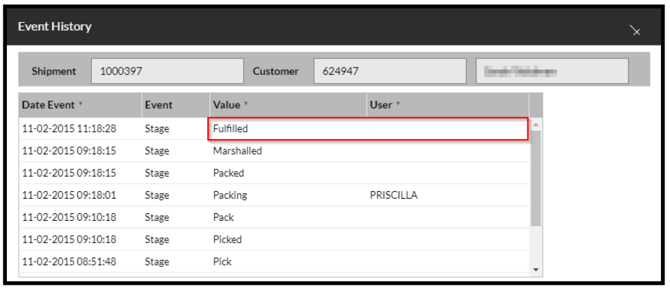
- Look at the row in which the Value is 'Fulfilled'.
If there is a value in the User column then the order has been manually shipped:
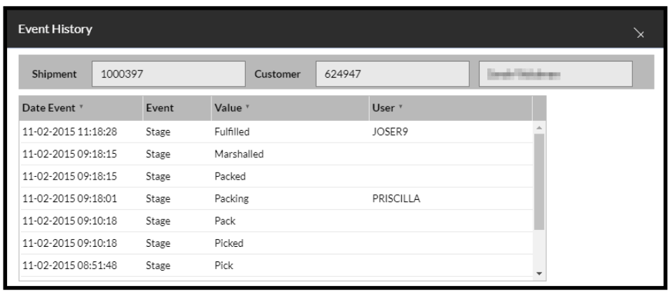
If it is blank, as in the picture below, then the system has followed the workflow, and tracking information should have been created:
If there is still no tracking information, raise a ticket with the SnapFulfil Service Desk who will investigate further.