
The following image and table provide information about the menu that displays after successfully logging in to the SnapFulfil web-based system. The menu and functionality available within each option may differ for you depending on which user group you are assigned to. Your company may also have some bespoke menu options which are not part of the standard set up.
- To view the Menu, click the three line menu icon.

- The topics are displayed under the heading All Categories. To close the Menu of Topics click the X icon.
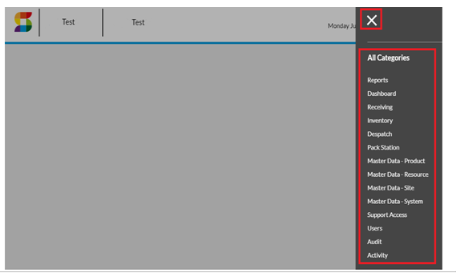
| Topic | Description |
| Receiving | Access options relating to the receiving process |
| Inventory | View and maintain stock |
| Dispatch | Access options relating to the dispatch process |
| Master Data - Product | View and maintain product data |
| Master Data - Site | View and maintain warehouse layout, carriers, customers and suppliers |
| Master Data - Resource | View and maintain RF operator, RF devices and FLT configuration |
| Activity | Access various utilities including task workflow maintenance, operator performance, warehouse occupancy and utilization, supervisor messages, host interfaces and user sessions |
| Audit | Access options relating to audit/stock check process |
| Users | View and maintain SnapFulfil users |