Below is a lost of the base reports that can be added to the reports screen of SnapFulfil along with a description of each of them:
Carrier Load Manifest:
- SnapFulfil Attachment Report
- SnapFulfil Audit Variance Report
- Goods Out Delivery Report
- SnapFulfil Dispatch Report
- Due Out Order Report
- Goods In Report
- SnapFulfil Historical Receipts Report
- Stock Occupancy Report
- Order Fulfillment – Ad Hoc Report
- Customer Order Fulfillment Analysis Report
- SnapFulfil Pickface Volume Analysis Report
- SnapFulfil Released Order Report
- SnapFulfil Shortage Report
- SnapFulfil Shortage Report
- SnapFulfil Stock Levels Report
- SnapFulfil Stock by Location Report
- SnapFulfil Stock Report
- Transfer of Ownership Report
- SnapFulfil Warehouse Performance Report
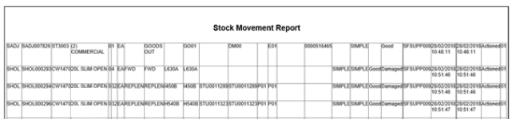
- SnapFulfil Stock Move Report
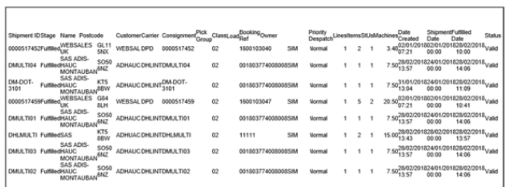
- Customer Shipments – Order Report
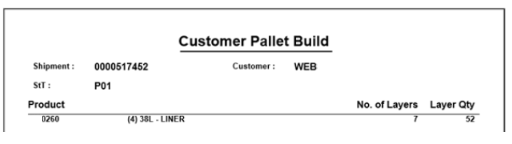
- Customer Pallet Build Report
- SnapFulfil Order Report
- Incorrect Replenishment Locations
- Multi Volume Consignment Note
- Serial Mismatch Report
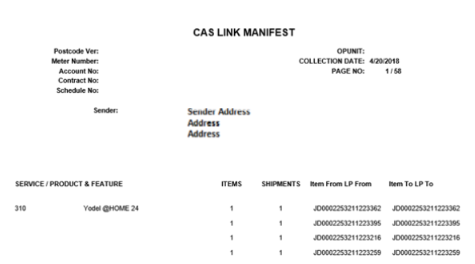
- Yodel Monthly Report Summary
- Yodel Monthly Report
- Yodel Daily Report Summary
- Yodel Daily Report
Carrier Load Manifest
Filename
Carrier_load_manifest.mrt
Description
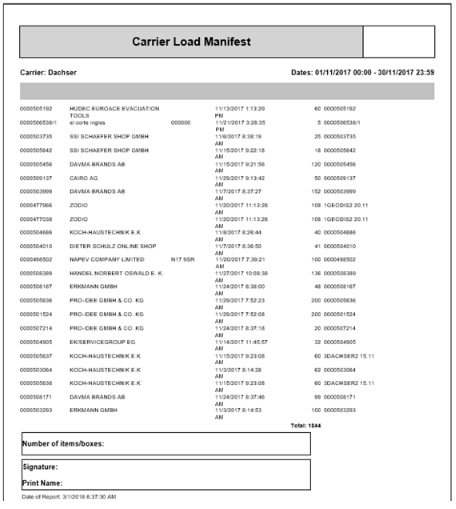
Returns SHIPMENT_HEADER and CARRIER information for fulfilled shipments within a specified date range.
Example and Field Mappings
- Carrier name (headline)
- Shipment ID
- Customer ID and name
- Despatch date and time
- Number of items despatched
- Associated pick group reference.
In addition two boxes or are required to be drawn at the bottom of the sheet to allow the vehicle driver to write:
- Number of items/boxes
- Signature and Name Print
SnapFulfil Attachment Report
Filename
Snap_attachment_report.mrt
Description
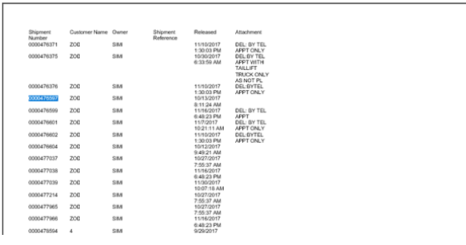
This report provides details of any shipments that contain an attachment on the shipment header. Even if an attachment is setup with blank content it will still appear on this report.
Example and Field Mappings
- Shipment Number
- Customer Name
- Owner
- Shipment Reference
- Released Date and Time
- Attachment Field
SnapFulfil Audit Variance Report
Filename
Snap_audit_report.mrt
Description
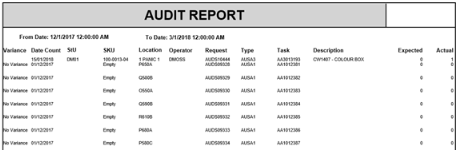
Returns audit data between a certain date range.
Example and Field Mappings
- Variance – Was there a variance on the audit?
- Date Count – Date of the audit count being made
- SKU – SKU where there was a variance (blank if no variance)
- Location
- Operator – Operator who recorded the variance
- Request – Audit Request
- Type – Audit task type
- Task – Audit task ID
- Description – SKU description
- Expected – Expected count number
- Actual – Actual count number
Goods Out Delivery Report
Filename
Snap_delivery_report.mrt
Description
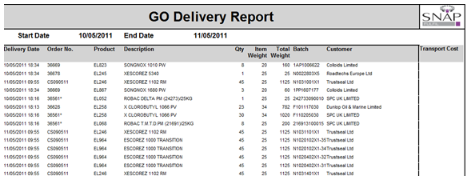
Returns the quantity shipped per shipment for a specified owner within a specified date range.
Example and Field Mappings
- Delivery Date – will be retrieved from the Order Header field Date Deliver.
- Order Number – will be retrieved from the Order Header field Shipment.
- Product Code will be retrieved from the Order Detail field Product.
- Description – will be retrieved from the Product file (SKU_PRODUCT).
- Qty – will be retrieved from the Order Detail field Quantity Ordered
- Item Weight – will be retrieved from the Product file (SKU_PRODUCT).
- Total Weight – will be calculated from Item Weight multiplied by Line Qty.
- Batch - will be retrieved from the Special Conditions. If no specific batch has been requested then the Batch will show as blank on the report.
- Customer – will be retrieved from the Order Header and then the description retrieved is what will show in the report.
SnapFulfil Despatch Report
Filename
Snap_despatch_report.mrt
Description
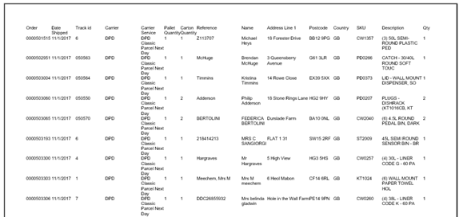
This report provides details of all shipped shipments on a specific date for a specific owner and carrier.
Example and Field Mappings
- Order - SHH_SHIPMENT
- Date Shipped - SHH_DATECLOSED
- Track Id - SHH_CARRIERTRACK
- Carrier - SHH_CARRIER
- Carrier Service - Text Description of SHH_SHIPMETHOD
- Pallet Qty - SHH_STUQTY
- Carton Qty - SHH_LINEQTY
- Reference - SHH_CUSTOMERREF
- Name - ADD_NAME where ADD_KEY = SHH_SHIPMENT and ADD_ID SHH_SHIPADDRESS
- Address Line 1 - ADD_LINE1 where ADD_KEY = SHH_SHIPMENT and ADD_ID SHH_SHIPADDRESS
- Postcode - ADD_POSTCODE where ADD_KEY = SHH_SHIPMENT and ADD_ID = SHH_SHIPADDRESS
- Country - ADD_COUNTRY where ADD_KEY = SHH_SHIPMENT and ADD_ID = SHH_SHIPADDRESS
- SKU - SHL_SKU
- Description - SKU_DESCRIPTION
- Quantity - SHL_QTYSHIPPED
All of the fields should be populated for each Shipment Line that exists where the Order Stage = ‘90’
Due Out Order Report
Filename
Snap_dueout_order.mrt
Description
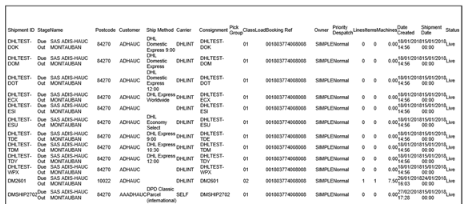
Returns SHIPMENT_HEADER and ADDRESS details for due out shipments.
Example and Field Mappings
- Shipment ID
- Stage
- Customer Name
- Postcode set against the address details on the Shipment
- Customer ID
- Shipment Method
- Carrier ID
- Consignment ID
- Pick Group ID
- Shipment Class
- Load ID
- Shipment Reference
- Owner ID
- Priority Despatch
- Lines
- Items
- Weight
- Date Created
- Shipment Date
- Shipment Status
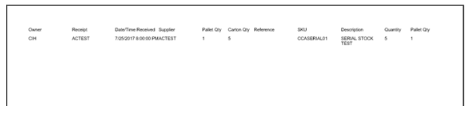
Goods In Report
Filename
Snap_goodsin_report.mrt
Description
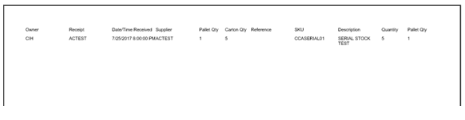
This report provides receipt details based on the date of the receipt being created, the owner and the supplier
Example and Field Mappings
- Owner - REH_OWNER
- Receipt - REH_RECEIPT
- Date / Time Received - REH_DATERECEIVED in DD/MM/YYYY HH:MM (12 hour) format
- Supplier - REH_SUPPLIER
- Pallet Qty - REH_STUQTY
- Carton Qty - REH_LINEQTY
- Reference - REH_SUPPLIERREF
- SKU - REL_SKU
- Description - SKU_DESCRIPTION
- Quantity - REL_QTYRECEIVED
- Pallet Qty - REH_STUQTY
All of the fields should be populated for each Receipt Line that exists where the Receipt Stage = ‘90’
The report should allow the data to be filtered by the following:
- Owner
- Date Shipped
- Supplier
Snapfulfil Historical Receipts Report
Filename
Snap_historical_receipts.mrt
Description
Returns RECEIPT_HEADER, RECEIPT_LINE and PRODUCT_SKU information for Received receipts within a specified date range.
Example and Field Mappings
The report will be headed and sequenced in the following format:
- Date/time range
- Supplier ID and name
- PO number – this is the SAP Purchase Order number and should be populated in the Reference field on the Receipt Detail screen.
- Receipt reference – the Receipt Id.
For each receipt the receipt line information will be reported:
- Line ID
- Product ID
- Product Description
- Ordered Quantity
- Received Quantity
- Unit of Measure for the Product
- Page breaks will occur at the following points:
- By Supplier
- By PO
To ensure a PO reference is entered, the Reference field in the receipts screen will be configured to be mandatory.
Stock Occupancy Report
Filename
snap_occupancy_report.mrt
Description
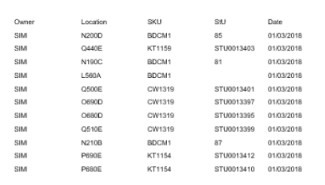
This report will provide SKU and STU information by location at the time of running the report.
Example and Field Mappings
- Owner - STK_OWNER – Stock Owner
- Location - STK_SLOT – Stock Location
- SKU - STK_SKU – Stock SKU (If more than one SKU then the word ‘Multiple’ should be displayed).
- StU - STK_STU – Stock STU
- Date - Current Date in DD/MM/YYYY format
Order Fulfilment – Ad Hoc Report
Filename
Snap_order_fulfilment.mrt
Description
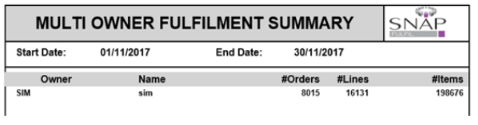
Returns the number of orders, lines and items separated by Owner within a specified date range
Example and Field Mappings
- Owner ID
- Owner Name
- Number of Orders
- Number of Lines
- Number of Items
Customer Order Fulfilment Analysis Report
Filename
Snap_picked_by_customer_order.mrt
Description
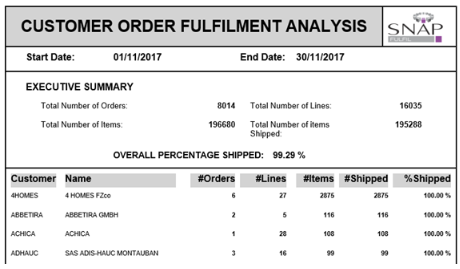
Returns a count of fulfilled shipments grouped by customer within a specified date range
Example and Field Mappings
- Customer - Customer value against the shipment (SHH_CUSTOMER)
- Customer Name - Customer Name against the Shipment (SHH_CUSTOMERNAME)
- Orders – Total number of orders
- Lines - Total number of lines on the shipment header
- Items - Total number of items on the shipment
- Shipped - Total number of items shipped on the shipment
- %Shipped - % Value of items shipped against the shipment (0-100%)
SnapFulfil Pickface Volume Analysis Report
Filename
Snap_picked_by_product.mrt
Description
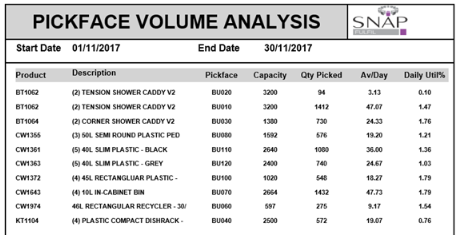
This report provides an analysis of the pick faces separated by product and location and provides a visual representation of how the pick faces are used between a user specified start and end date.
Example and Field Mappings
- Product – SKU ID
- Description – SKU Description
- Pickface – Slot
- Capacity – The Maximumn Quantity set against the replenishment record for the product/slot
- Qty Picked – The number of items picked
- Av/Day – The sum of quantity picked between the Start and End Date, divided by the number of days between the Start and End Date
- Daily Util% - (Av/Day divided by Capacity) x 100
Snapfulfil Released Order Report
Filename
Snap_released_order.mrt
Description
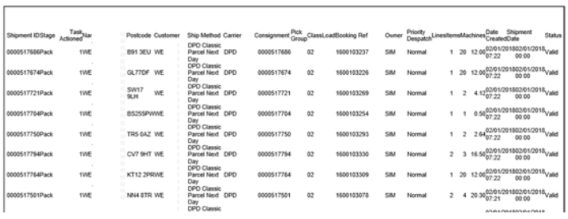
Returns SHIPMENT_HEADER and ADDRESS information for all shipments from stages released to fulfilled at the time of running the report.
Example and Field Mappings
- Shipment ID
- Stage – Shipment Stage
- Tasks Actioned – Number of Tasks actioned
- Name – Name on the Shipment
- Postcode – Postcode against the shipment address
- Customer – Customer ID
- Ship Method
- Carrier
- Consignment ID
- Pick Group ID
- Class – Shipment Class
- Load ID
- Booking Ref – Reference taken from the Shipment Header
- Owner
- Priority Despatch
- Line
- Items
- Machines – Total Weight of all items on the shipment taken from multiplying the SKU weight by the number of items
- Date Created
- Shipment Date
- Status – Shipment Status
SnapFulfil Shortage Report
Filename
Snap_shortage_report.mrt
Description
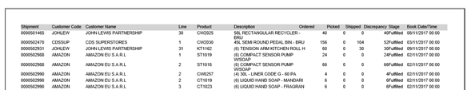
The report will show shipment header and shipment line details where:
- The booked date (SHH_DATESHIPMENT) is within the parameter dates entered on the first screen
- The ship stage is Picked (29) or above, including fulfilled (90)
- There is a shortage (picked/shipped is less than ordered)
- All ship classes (order types) to be included
- All carriers to be included
Example and Field Mappings
- Shipment ID
- Customer ID
- Customer Name
- Line ID
- Product Code
- SKU Description
- Quantity Ordered
- Quantity Picked
- Quantity Shipped
- Discrepancy (Quantity Ordered Minus Quantity Picked)
- Shipment Stage
- Book Date/Time – Date Shipment
Snapfulfil Shortage Report
Filename
Snap_shortage_summary.mrt
Description
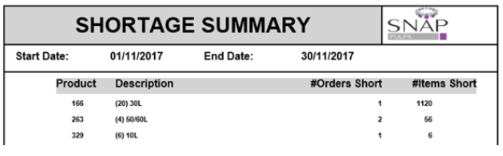
Returns SHIPMENT_HEADER, SHIPMENT_LINE and PRODUCT_SKU information for fulfilled shipments with a variance within a specified date range.
Example and Field Mappings
- Product
- Description
- Orders Short – The number of orders where there was a variance for this product
- Items Short – The number of items where there was a variance for this product
SnapFulfil Stock Levels Report
Filename
Snap_stock_level.mrt
Description
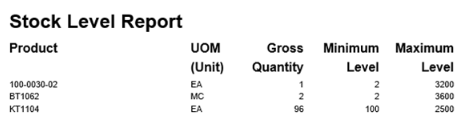
Returns STOCK, REPLENISHMENT and PRODUCT_SKU information. Groups records by product giving a sum of quantity.
The report is required to show those products whose warehouse Gross stock quantity is equal to or below their minimum level.
The difference in the two values is to be expressed in the stored quantity and the equivalent pallet quantity.
Example and Field Mappings
- Product
- UOM (Unit)
- Gross Quantity
- Minimum Level
- Maximum Level
Only those products whose current gross quantity is equal to or below the set minimum stock level, are to be reported.
The product record to be selected will satisfy the following criteria:
The UOM is the outer UOM value set on the product master record, e.g. cs.
The stock status is Good.
SnapFulfil Stock by Location Report
Filename
Snap_stock_location.mrt
Description
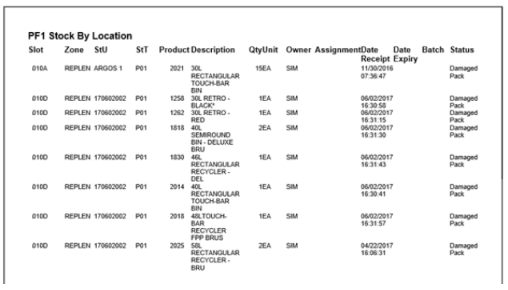
This report provides a summary of all stock within the warehouse at the time of running the report
Example and Field Mappings
- Slot
- Zone
- StU
- StT
- Product
- Product Description
- Quantity
- Unit of Measure
- Owner
- Shipment Reference (if assigned to a shipment)
- Date Receipt – Date the stock was received
- Date Expiry – The expiry date of the stock
- Batch – The Batch code associated with the stock
- Status – The status of the stock
SnapFulfil Stock Report
Filename
snap_stock_report.mrt
Description
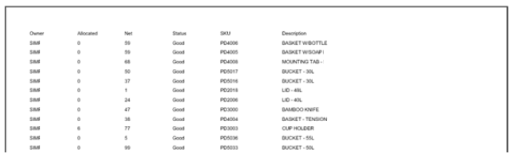
This report displays the allocated and net stock quantity per product based on the Owner that is specified when first running the report
Example and Field Mappings
- Owner - STO_OWNER
- Allocated - Sum of (STO_QTYALLOCATED + STO_QTYASSIGNED)
- Net - Sum of STO_QTY – (STO_QTYALLOCATED + STO_QTYASSIGNED)
- Status - The description for the STO_STATUS
- SKU - STO_SKU
- Description - SKU_DESCRIPTION
Transfer of Ownership Report
Transfer of Ownership
Snap_transfer_of_ownership.mrt
Description
Returns STOCK_MOVEMENT and PRODUCT_SKU information for all actioned OWNER change movements within a specified date range.
Example and Field Mappings
- From Owner – The original owner before the movement was actioned
- To Owner – The new owner after the movement was actioned
- Product
- Product Description
- Pallet – The StU ID that the movement was completed against
- Quantity
- Date/Time

SnapFulfil Warehouse Performance Report
Filename
Snap_warehouse_performance.mrt
Description
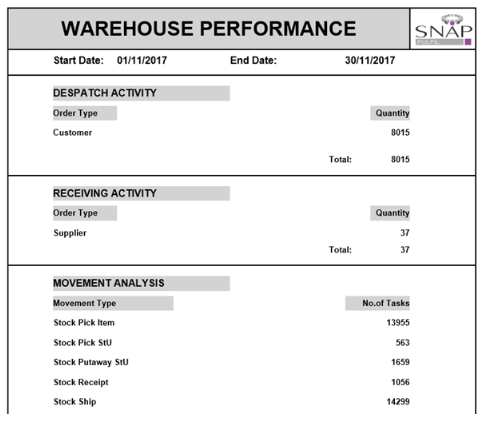
Returns a summary of information for STOCK_MOVEMENT, SHIPMENT_HEADER and RECEIPT_HEADER within the date range entered.
Example and Field Mappings
- Despatch Activity - Number of shipments completed, separated by Order Type
- Receiving Activity – Number of receipts completed, separated by Supplier
- Movement Analysis – Number of movements completed, separated by Movement Type
SnapFulfil Stock Move Report
Filename
Stock_move_report.mrt
Description
Returns Stock Movement information for actioned or closed movements
Example and Field Mappings
- Movement Type
- Movement ID
- SKU
- SKU Description
- Qty Tasked
- Qty Actioned
- UOM
- From Zone
- To Zone
- From Slot
- To Slot
- From StU
- To StU
- From STT
- To STT
- From Assignment Reference
- To Assignment Reference
- From Owner
- To Owner
- From Status
- To Status
- Operator User ID
- Supervisor User ID
- Date Created
- Date Picked
- Date Closed
- Stage of the Movement
- Reason for the Movement
Customer Shipments – Order Report
Filename
Snap_closed_order.mrt
Description
Returns SHIPMENT_HEADER and ADDRESS information for shipments with a stage of Fulfilled.
Example and Field Mappings
- Shipment - Displays the Shipment ID
- Stage - Displays the current stage of the shipment
- Customer Name - Displays the “Name” field within the detail tab of the shipment
- Postcode – Postcode taken from the address set against the customer shipment
- Customer - Displays the “Customer” field within the detail tab of the shipment
- Carrier – The Carrier ID
- Consignment ID
- Pick Group ID
- Class – Shipment Class set against the shipment
- Load ID
- Booking Ref – The reference set against the shipment header
- Owner
- Priority Despatch
- Lines - Displays the “Lines” field within the detail tab of the shipment
- Items - Displays the “Items” field within the detail tab of the shipment
- Machines – Weight taken from the product multiplied by the number of items
- Date Created - Displays the date the shipment was created
- Date Shipment - Displays the date the shipment is scheduled to be shipped
- Date Closed - Displays the date the shipment has progressed to Fulfilled
- Status - Displays the Status of the shipment
Customer Pallet Build Report
Filename
Snap_customer_pallet_build.mrt
Description
Returns product configuration details for a specified shipment’s product lines. You must enter the shipment ID and the StT in question when running this report
Example and Field Mappings
- Product - Product required on the shipment
- Number of Layers - Number of layers for the required StT
- Layer Quantity - Layer quantity for the required StT
Snapfulfil Order Report
Filename
Snap_order_report.mrt
Description
This report details shipments based on the Owner, Stage (Active, Deleted or Purged) and the Date Created/Date Shipment as specified at the beginning of the report
Example and Field Mappings
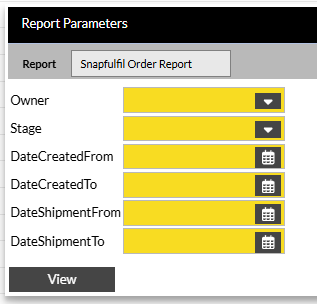
This should display the for orders not yet Shipped.
The report should allow the data to be filtered by the following:
- Owner
- Stage
- Date Created
- Shipment Date
Incorrect Replenishment Locations
Filename
Snap_incorrect_replen_slots.mrt
Description
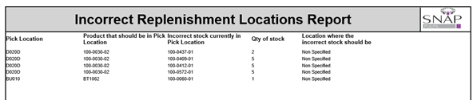
Report to show replenishment locations with the incorrect stock. This report will also show which stock should have been expected in the location.
Example and Field Mappings
- STK_SLOT - Pick Location
- RPL_SKU - Product that should be in Pick Location
- STK_SKU - Incorrect stock currently in Pick Location
- STK_QTY - Qty of stock
- RPL_AREA - Location where the incorrect stock should be - Should say “Non Specified” if result is NULL
Multi Volume Consignment Note
Filename
dpd_collection_manifest.mrt
Description
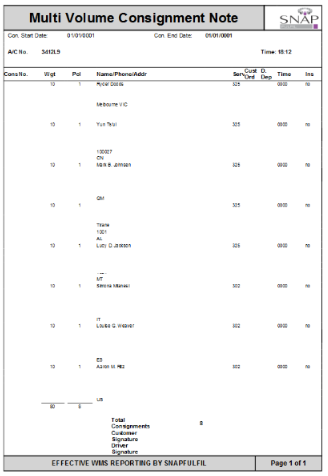
Returns SHIPMENT_HEADER and ADDRESS information for fulfilled shipments with a carrier of DPD or DPDINT within a certain date range.
Example and Field Mappings
Serial Mismatch Report
Filename
Snap_serial_mismatch.mrt
Description
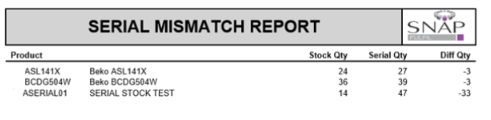
Returns STOCK and PRODUCT_SKU information for SKUs which utilize serialization, and that have serials within the system at stage 10 or 80 and where the STK_QTY does not match the amount of serials.
Example and Field Mappings
- Product – SKU ID followed by SKU Description
- Stock Quantity – The number of items in stock
- Serial Quantity – The number of serial numbers currently active within the system against that SKU
- Diff Qty – The difference between Stock Quantity and Serial Quantity
Yodel Monthly Report Summary
Filename
monthly_report_summary.mrt
Description
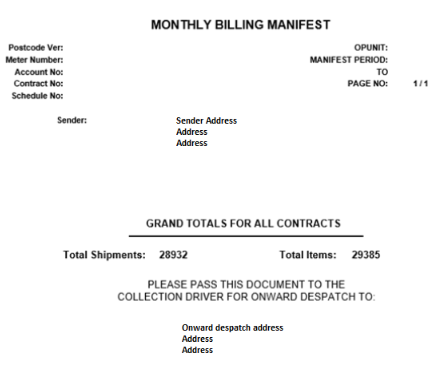
Returns information of the Yodel Service Method, Quantity of Shipments & Items dispatched within the entered date range by the user. This paper work includes the request to pass onto the collection driver to forward to the carrier Administrative dispatch center.
Example and Field Mappings
The header and message below the Grand Total line contains static information
- Total Shipments – Number of shipments across all Shipment Methods
- Total Items – Total number of items on the number of shipments
Yodel Monthly Report
Filename
monthly_report.mrt
Description
Returns information of the Yodel Service Method, Quantity of Shipments & Items dispatched within the entered date range by the user.
Example and Field Mappings
The header contains static information
- Product/Service – Shipment Method
- Shipment – Number of Shipments on the Shipment Method
- Items – Number of items on the shipments
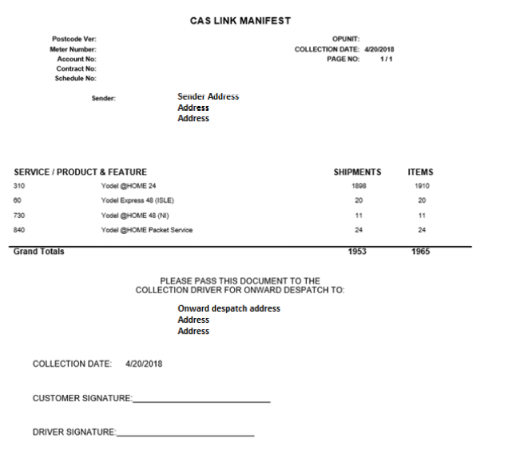
Yodel Daily Report Summary
Filename
daily_report_summary.mrt
Description
Returns information of the Yodel Service Method, Quantity of Shipments & Items dispatched on the Contract account method selected within the entered date range by the user.
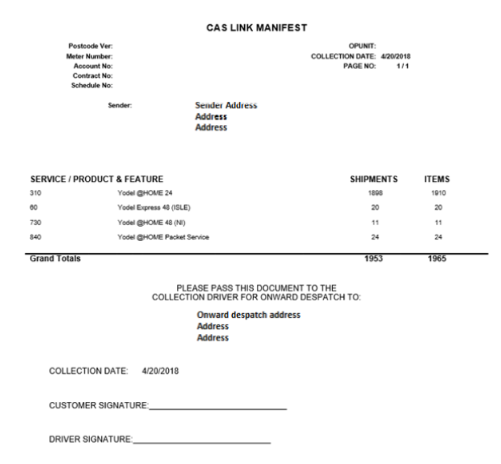
Paper work that can be given to the Collection driver confirm amount of parcels shipped from the warehouse. And can be passed internally to the administrative department at the carriers.
Example and Field Mappings
The header and message below the Grand Total line contains static information
- Service/Product & Feature – Shipment Method
- Shipments – Number of shipments
- Items – Number of items on the number of shipments
Yodel Daily Report
Filename
daily_report.mrt
Description
Returns information of the Yodel Service Method breakdown per shipment and the Items in Quantity contained, with associated Tracking Reference. With a total Quantity Of Items and Shipments (Consignments)
Example and Field Mappings
The header contains static information
- Service/Product & Feature – Shipment Method
- Items – Number of items on the shipment
- Shipment – Number of Shipments (1)
- Item From LP From/Item To LP To – Tracking ID